
Your message is the key to every conversation. With the Tone of Voice feature, Leadvista AI learns your natural writing style and applies it across all outreach and replies, so prospects feel like they're talking to a real person, not a bot.
Prerequisites
- An active Leadvista AI agent with at least one sender configured
- At least a few LinkedIn messages sent from that account (the AI learns from your recent messages)
How to Set Up Your Tone of Voice
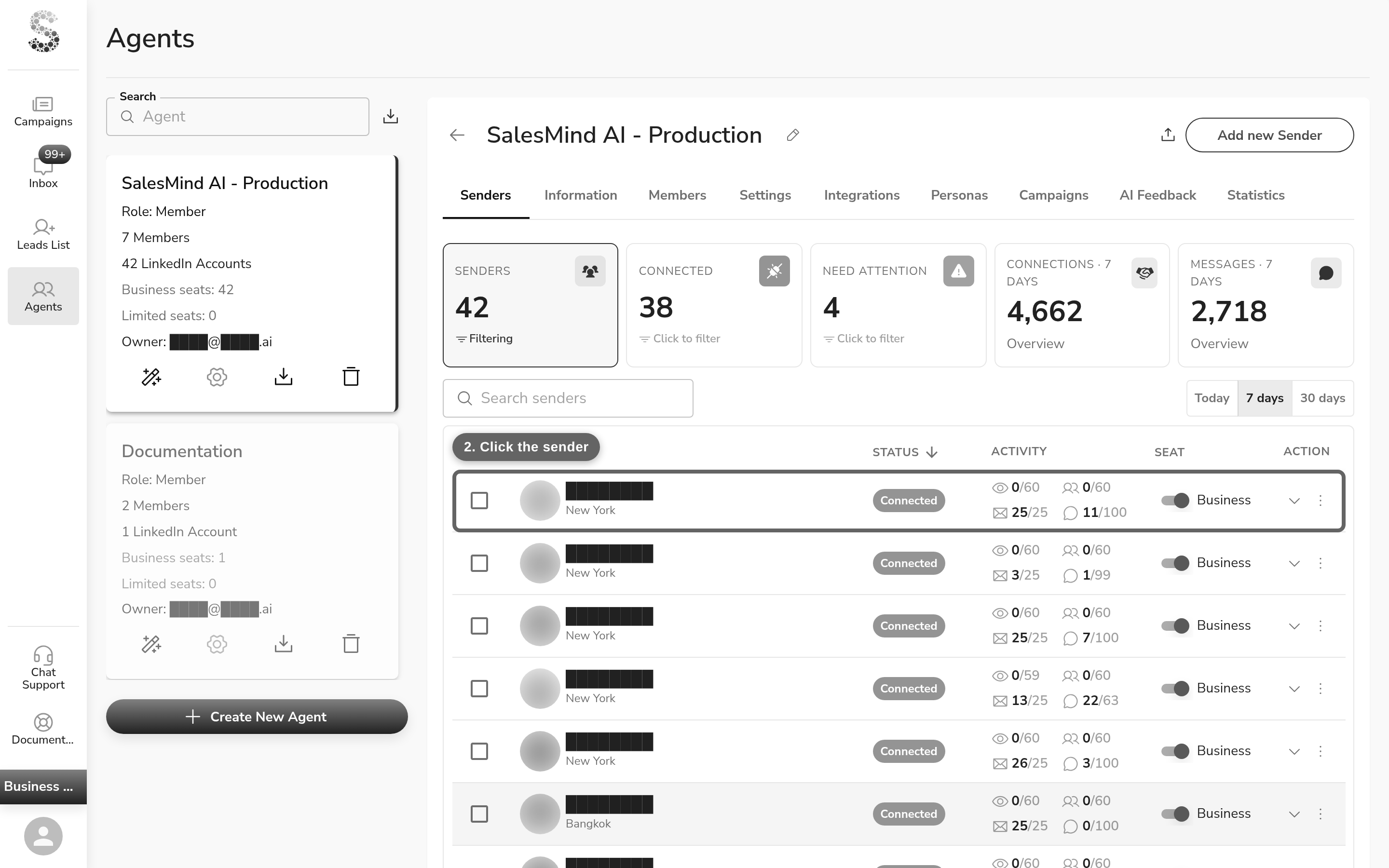
- Click Agents in the left-hand menu.
- Click on the sender you want to configure (from the senders list).
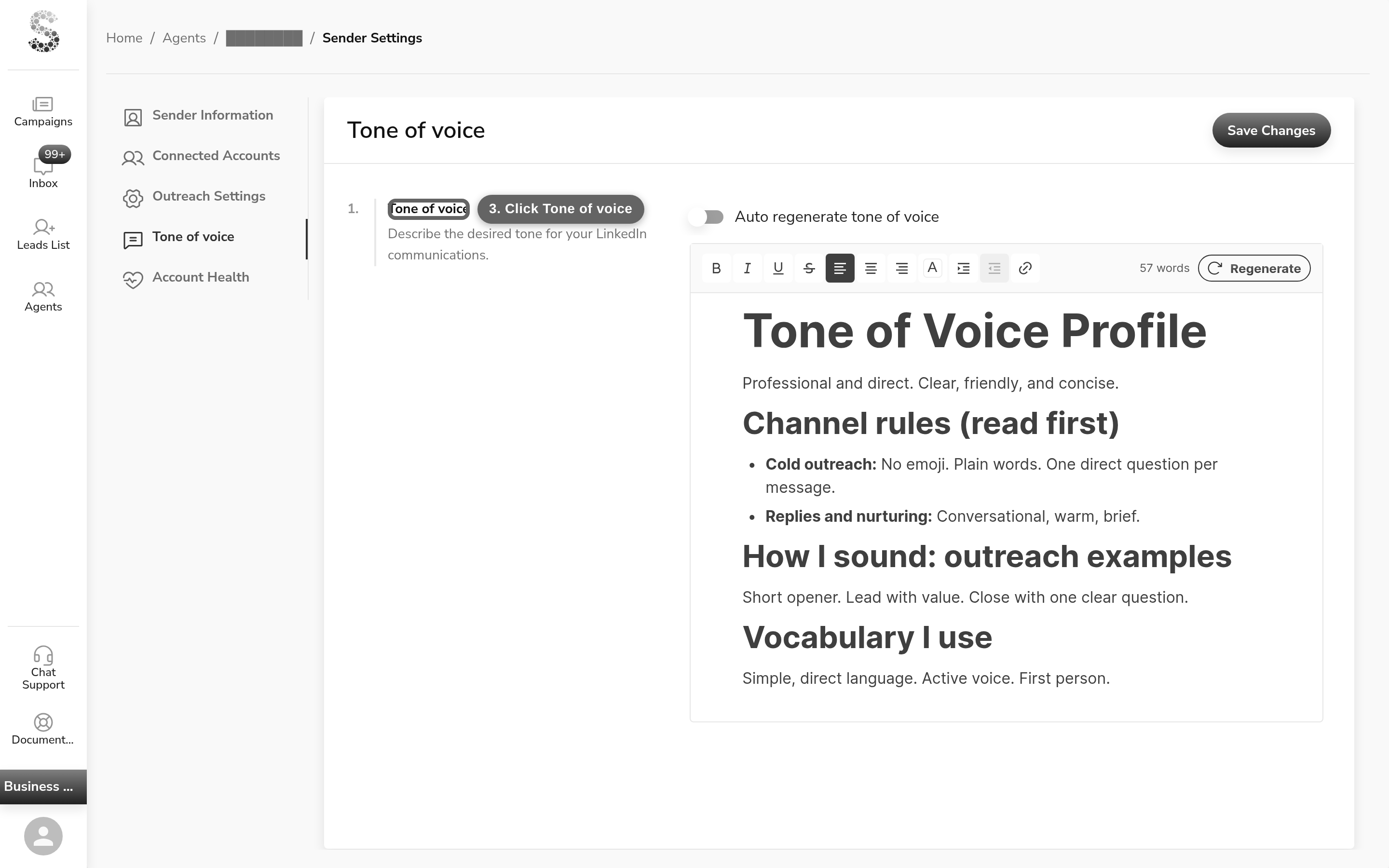
- Click the Tone of voice tab in the left-hand menu.
You'll see:
- Description: "Describe the desired tone for your LinkedIn communications."
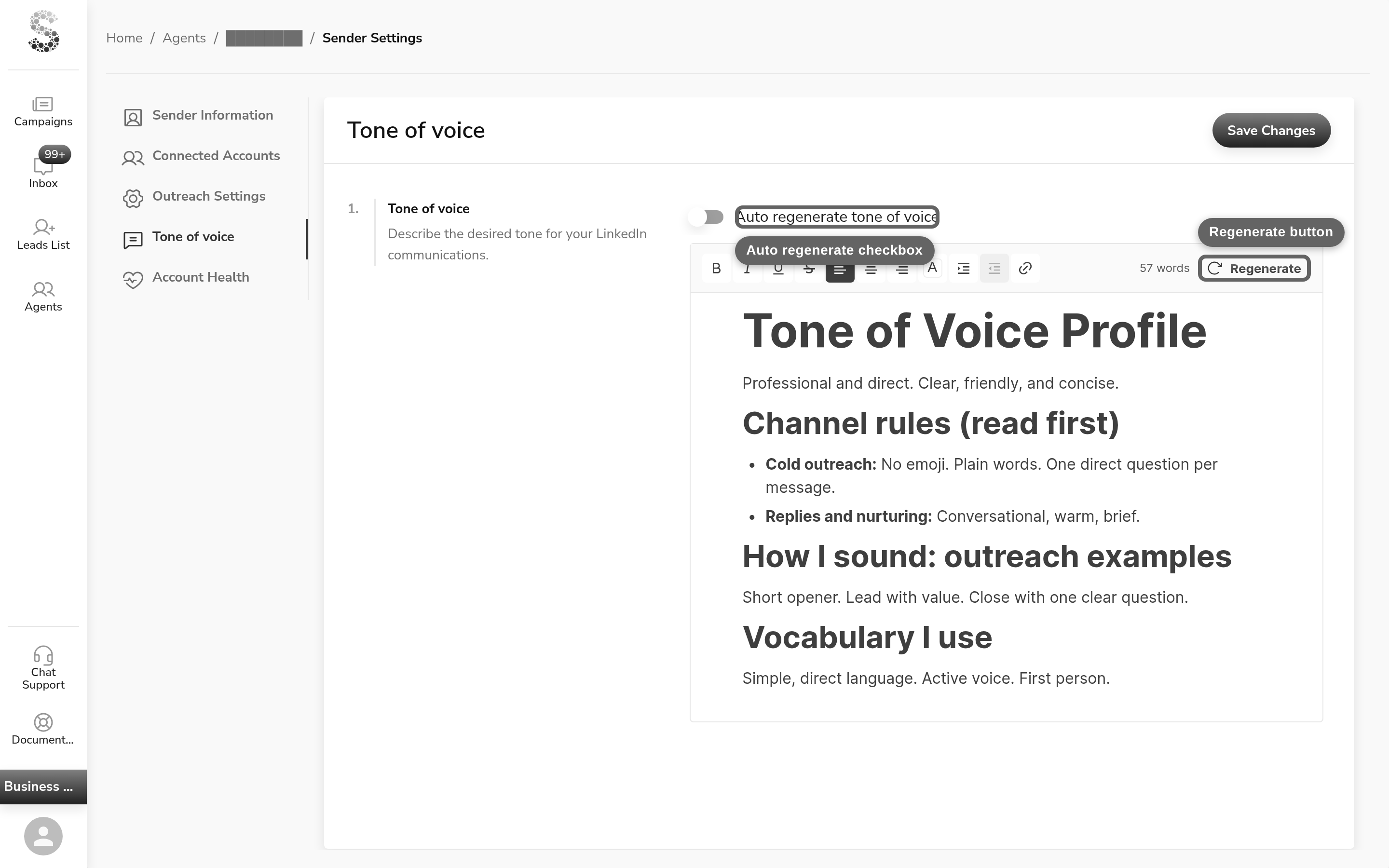
- "Auto regenerate tone of voice" checkbox — when enabled, your tone of voice is regenerated automatically based on your 20 most recent LinkedIn messages — the more you write, the better it learns your style
- An editable text area showing your current tone profile (auto-saves on blur)
- A "Regenerate" button (tooltip: "Regenerate tone of voice with AI") — triggers async AI generation; result arrives in real time

How It Works
Tone of Voice runs in the background on every message Leadvista AI sends.
- Analyzes your past messages: scans your recent LinkedIn messages to learn your natural communication style.
- Generates your tone profile: gives you a starting point you can review and edit.
- Applies it automatically: used in outreach, follow-ups, and replies.
- Updates on demand: click Regenerate anytime your style evolves.
💡 Tip: Review your generated tone before launching a campaign. If it doesn't sound like you, edit it before going live.
How Tone of Voice Affects Message Readability
Your tone of voice shapes how the AI writes. A formal voice produces more complex sentences. A casual voice produces simpler ones.
Every English message is checked for readability using the FK (Flesch-Kincaid) score. (Messages in other languages skip the readability score but keep all other quality checks.) This score measures grade level:
- Grade 5 or lower: Very easy to read
- Grade 5 to 7: Easy to read (target range)
- Grade 8 or higher: Harder to read
Leadvista AI aims for grade 5 to 7. If your tone of voice is very formal, your messages may score higher. This is normal, but it can trigger quality checks.
Tip: If your messages sound too formal, try editing your tone of voice to use simpler language. Remove phrases like "overly formal language" or "delivery leadership expert" if your messages get blocked.
What happens when a message fails a quality check
The AI tries again with simpler language. It attempts up to 3 times, then ships the best version it produced. Only messages that stay at the lowest quality grades are held back.
You can also use thumbs-down feedback on a message. This tells the AI to adjust its approach next time.
Why It Matters
| Benefit | What it means |
|---|---|
| More replies | Prospects engage when messages feel real |
| Consistency at scale | Your whole team sounds aligned |
| Save time | No more rewriting every message by hand |
| Credibility | A consistent voice builds trust faster |
Best Practices
- Keep edits short and natural. Small tweaks make a big difference.
- Hit Regenerate if your messaging style changes over time.
- Apply the same tone across multiple campaigns for consistency.
- Share your edited tone with teammates to keep your brand voice unified.
⚠️ Warning: If engagement is low, try regenerating your tone or editing it manually before assuming the campaign targeting is the issue.
What's Next
- Learn how the AI personalizes messages beyond tone: see How AI Assists in Personalization
- Set up Autopilot to let the AI send replies automatically: see Start Using the New Autopilot & CRM Features
What Belongs in Tone of Voice (and What Does Not)
Tone of Voice shapes how you sound — nothing else. It is read as style: rhythm, word choice, formality, warmth. It is not a rules engine, and long documents pasted here are trimmed.
| Content | Belongs here? | Where it goes instead |
|---|---|---|
| How you write (style, phrases you use or avoid) | ✅ Yes | — |
| Selling strategy, angles, differentiators | ❌ No | Persona playbook |
| What you sell, claims, value proposition | ❌ No | Campaign solution |
| Rules for a specific message ("No CTA", required links) | ❌ No | Touchpoint instructions — these steer/guide the AI |
For the full map of where each piece of content goes, see How the AI Reads Your Content.
FAQ
People said my messages sound like AI — what should I do?
Three fixes, in order. First, edit or Regenerate your Tone of voice on the sender so the AI matches your real style. Second, tighten the per-step message instructions — they steer and guide the AI toward what you want, they don't force it. Third, if you need a message sent word for word, switch that step to the Human writer, which sends your copy as written.
Why do my messages sound generic, like a template?
Two common causes. Your Tailored Sales Playbook may still be vague or default — fill it with real details about your company and offer. Also, avoid pasting ready-made example messages into a step's instructions; the AI copies them, so every prospect gets the same pitch. Tell the AI what you want instead.
One sender's messages feel stiff or robotic — how do I fix that?
Refresh that sender's saved Tone of voice. Edit the text to sound like you, or hit Regenerate. Watch for run-on sentences, an opening that pitches instead of greeting the person, and a missing closing question — those are the usual tells.
The AI keeps rewording my message even though I wrote it exactly — how do I stop that?
The AI writer always rewrites and personalizes per lead by design. For copy sent word for word, switch that step to the Human writer. It sends your text as written and only fills in placeholders. A "send without changes" instruction is just a hint to the model, not a guarantee — the Human writer is the reliable way to keep wording exact.
What's the difference between tone of voice and a step's message instructions?
Tone of voice shapes how you sound across every message — rhythm, word choice, and formality. A step's instructions guide what one message should say — its angle, points to include, or things to avoid. Tone is your style everywhere; instructions steer a single step.